
Many scientific workflows require frequent reference to external databases such as NCBI or PubChem. Typically, this means keeping those sites open in another browser tab while working inside ChemCart.
Now, with embedded hyperlinks in labels, you can place direct links inside your custom forms for quick access.
You might be wondering:
“If I already have these websites bookmarked, why add them to my form?”
The answer: tags.
Tags allow you to dynamically pass field data into a URL, automating your external searches.
Example: CAS Number Lookup in NCBI
Imagine you’re a medicinal chemist who frequently looks up CAS numbers in NCBI.
Here’s how you can streamline the process:
- Assign a tag (e.g., “cas”) to your CAS number field.
- Embed that tag into a NCBI search URL inside a label hyperlink.
- Click the hyperlink from within your form.
When clicked, ChemCart automatically launches NCBI and runs a search for that specific CAS number, without any manual typing required.
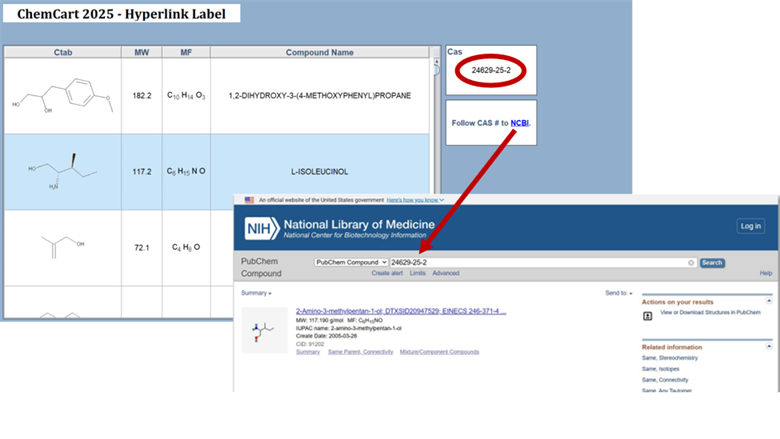
Embedded Hyperlinks in Labels: Tag anything on your form and insert into a commonly used URL to simply click and find the data you need.
End Result: One click launches a pre-filled database search, delivering the data you need instantly.
